Stud Count: how many studs does this wall take?
One number for one straight wall at one layout. Enter the length, tap a spacing, read the count. It’s the check before you pull studs off the lift, not a full takeoff.
Inputs
- Wall length: feet-inch-fraction keypad, down to 1/16″.
- On-center spacing: 12″, 16″, 19.2″ or 24″ OC, or Custom (1″ to 120″). Defaults to 16″ OC.
- Include end studs: on by default. Off drops the two end studs and reports interior studs only.
What the result card shows
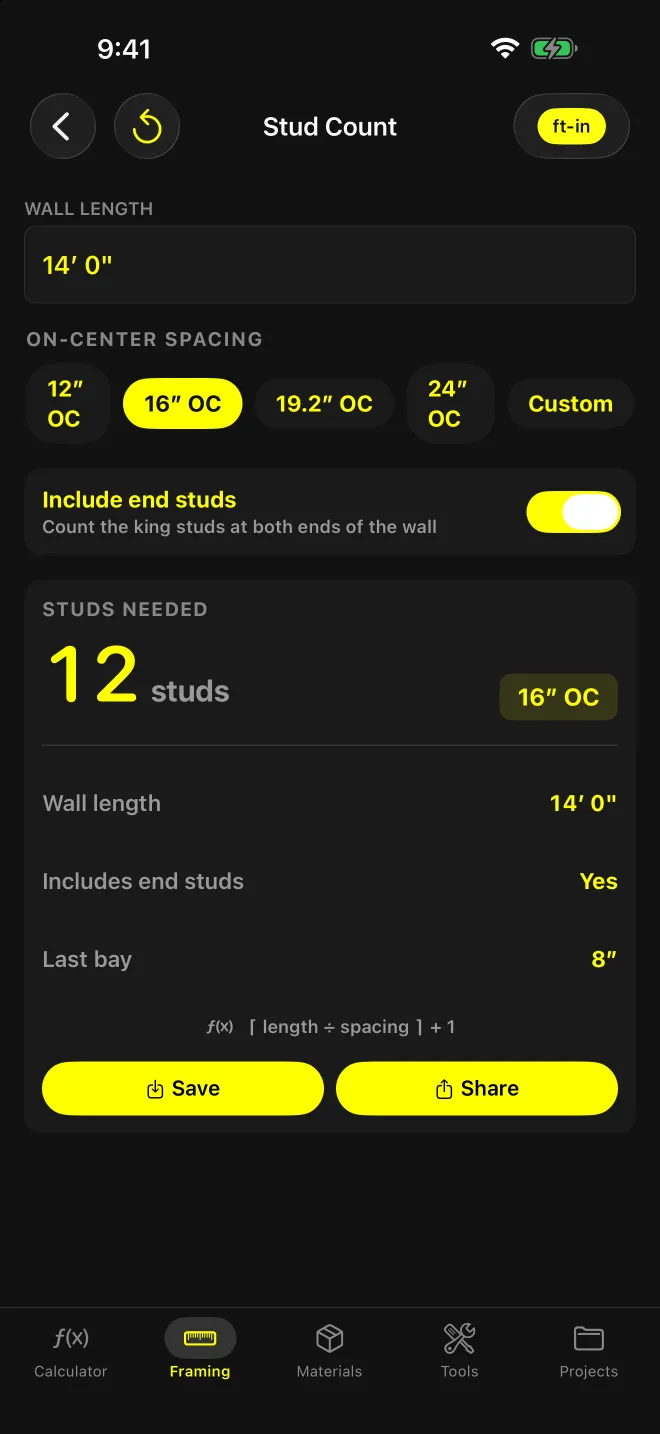
Studs needed, a spacing badge, then three rows: wall length, whether end studs are included, and the last bay. Last bay reads “Exact fit” when the length divides evenly by the spacing. Otherwise it shows the width of the short bay in inches.
Worked example: 14′ wall at 16″ OC
14′ is 168″. 168 ÷ 16 = 10.5, rounded up to 11, plus 1 = 12 studs. 168 isn’t a multiple of 16, so the last bay reads 8″: layout runs 0, 16, 32 … 160, then a closing stud at 168.
The formula prints under the result: ⌈ length ÷ spacing ⌉ + 1.
Framing Lumber (Pro): what does the full wall takeoff add?
Stud Count stops at layout. Framing Lumber turns one wall into a lumber order: layout studs, corners, partition tees, plate stock in boards you can actually buy, board feet, and cost if you enter prices.
Inputs
- Wall length and stud length, in decimal feet. Stud length defaults to 8.
- Lumber size: 2×4, 2×6, 2×8, 2×10, 2×12, 4×4, 4×6 or 6×6. (1× stock is left off this screen.)
- On-center spacing: 12″, 16″, 19.2″ or 24″ OC. No custom spacing here.
- Corners at 3 studs each, partition tees at 2 studs each.
- Plates: Single top (2 plates through the wall) or Double top (3).
- Plate stock length: defaults to 16 ft.
- Cost (optional): price per stud and price per plate board.
What the result card shows
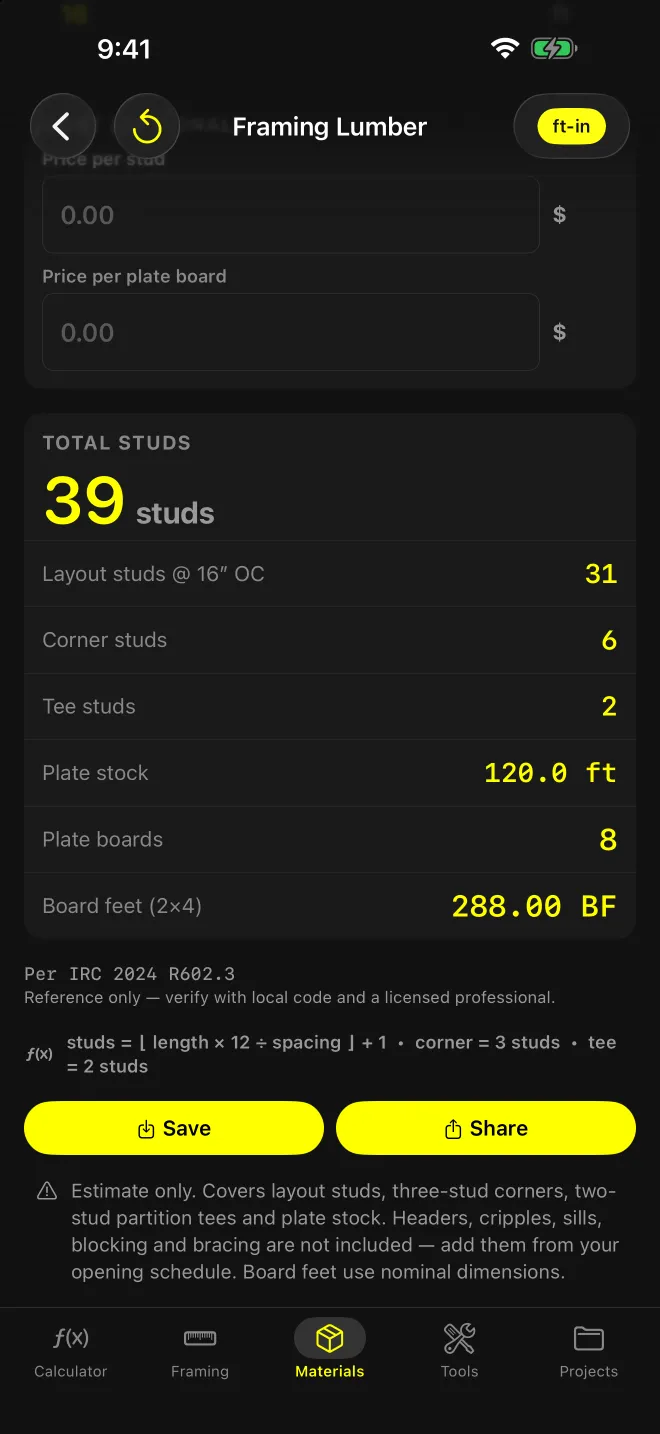
Total studs, then layout studs, corner studs, tee studs, plate stock in linear feet, plate boards, board feet for the selected size, and total cost once a price is entered. Share sends the same breakdown as text.
Worked example: 40′ wall, 2 corners, 1 tee
2×4 at 16″ OC, 8′ studs, double top plate, 16′ plate stock:
- Layout: 40 × 12 ÷ 16 = 30, + 1 = 31 studs
- Corners: 2 × 3 = 6 studs
- Tee: 1 × 2 = 2 studs
- Total: 39 studs
- Plate stock: 40 × 3 = 120.0 ft. 120 ÷ 16 = 7.5, rounded up to 8 plate boards
- Studs: 39 × (2 × 4 × 8 ÷ 12) = 39 × 5.33 = 208 BF
- Plates: 120 ft × 0.667 BF/ft = 80 BF
- Board feet: 288.00 BF
What neither screen covers
Framing Lumber covers layout studs, three-stud corners, two-stud tees and plate stock. Headers, cripples, sills, blocking and bracing are not included (the screen says so: add them from your opening schedule).
Board feet use nominal dimensions. A 2×4 counts as 2 × 4, not 1½ × 3½.
Stud length is what gets priced. The 8 ft default prices a full 8′ stud. If you’re buying 92⅝″ precuts, enter 7.72.
The two screens round the layout differently. Stud Count adds a closing stud when the wall isn’t a multiple of the spacing. Framing Lumber’s layout row is ⌊ length × 12 ÷ spacing ⌋ + 1 and doesn’t, so a 14′ wall at 16″ OC is 12 studs in Stud Count and 11 layout studs in Framing Lumber, before corners and tees.
Framing Lumber cites IRC 2024 R602.3 as its reference, with the app’s standard note: verify with local code and a licensed professional. Neither screen checks stud size or spacing against code. Sloped top plates go in Rake Wall, which gives every stud length by position.
Web or app?
The stud spacing calculator on this site runs the same layout count in a browser. Use it at a desk; use the app on the deck, where it works offline and keeps your recent walls one tap away.