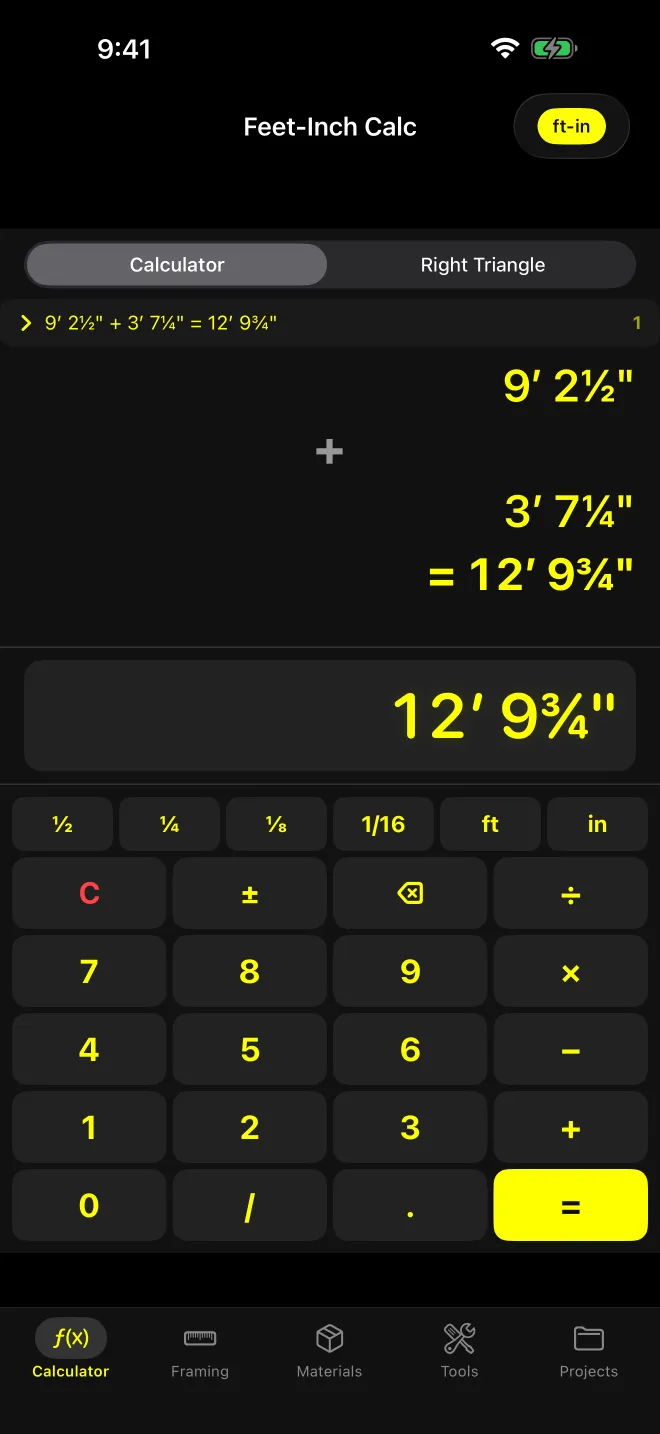
What does this screen solve?
Tape math without the decimal detour. Adding an opening to a return, splitting a wall into bays, backing ¾” off a cut. Converting 2½” to 0.2083’ on a phone calculator and back to sixteenths is where the mistakes come from. This screen never leaves feet, inches and fractions.
It’s the default screen on the Calculator tab, next to Right Triangle.
How do you key in a dimension?
Left to right, the way you read a tape:
- ft commits what you’ve typed as feet and moves on to inches.
- in commits inches and moves on to the fraction.
- ½ ¼ ⅛ 1/16 are additive. Tap ¼ three times and you have ¾. Past a full inch they wrap back around.
- / builds any fraction: 5 / 16 in gives 5/16”. Leave the denominator off and it assumes 16ths.
- A bare number with no unit key counts as feet.
Typing 6 then ½ with no unit key reads as 6½”. The fraction tap commits the number as inches.
The rest is a standard 4-column grid: C/AC, ±, ⌫, the four operators, 0, /, decimal point and =. C clears the entry. AC wipes the tape.
What does it show?
- Tape: every operand, operator and result, scrolling. Results are prefixed with =.
- Display: the entry as you type it, or the last result to the nearest 1/16”.
- Recent strip: your last 5 answers. Tap one to drop it into the display as the next operand.
- Format pill (top right): cycles ft-in → in → dec ft → dec in → metric. The tape and display re-render in place. Nothing gets re-keyed.
Metric swaps the fraction strip for m / cm / mm keys and disables the fraction bar. A bare number in metric counts as metres.
Worked example: 9’ 2½” + 3’ 7¼”
Keys: 9 ft 2 ½ + 3 ft 7 ¼ =
- Fractions: ½ + ¼ = ¾
- Inches: 2 + 7 = 9
- Feet: 9 + 3 = 12
Result: 12’ 9¾”. Underneath, it’s decimal feet: 9.208333 + 3.604167 = 12.8125’, and 0.8125 × 12 = 9.75”.
The tape reads 9’ 2½”, +, 3’ 7¼”, = 12’ 9¾”. Tap the pill to in and the same answer reads 153¾”.
Tap another operator instead of = and the running total carries into the next step. Results chain at full precision. Only the display rounds to 1/16”.
How do × and ÷ work?
The right-hand side is a count, not a length. 6’ × 2.5 = 15’. 10’ ÷ 4 = 2’ 6”. That’s how you split a run into equal bays or multiply a stud length by a count.
(In imperial the multiplier is read by its value in feet, so 6’ × 2’ returns 12’, not 12 sq ft. For square footage, use Area & Volume.) In metric the multiplier is read in metres: 2 m × 3 = 6 m.
Dividing by zero shows “Cannot divide by zero” instead of a number. Negative results display with a minus sign, which is what you want when backing a measurement off.
What are the limits?
- 1/16” display. The strip stops at 1/16. You can key 1/32 with the fraction bar, but results still round to the nearest 1/16”.
- Lengths only. No square feet, no board feet. Lumber volume lives on the Board Feet screen.
- One calculation at a time. The tape is a running record, not a memory register. The recent strip holds 5 answers, and AC clears the tape.