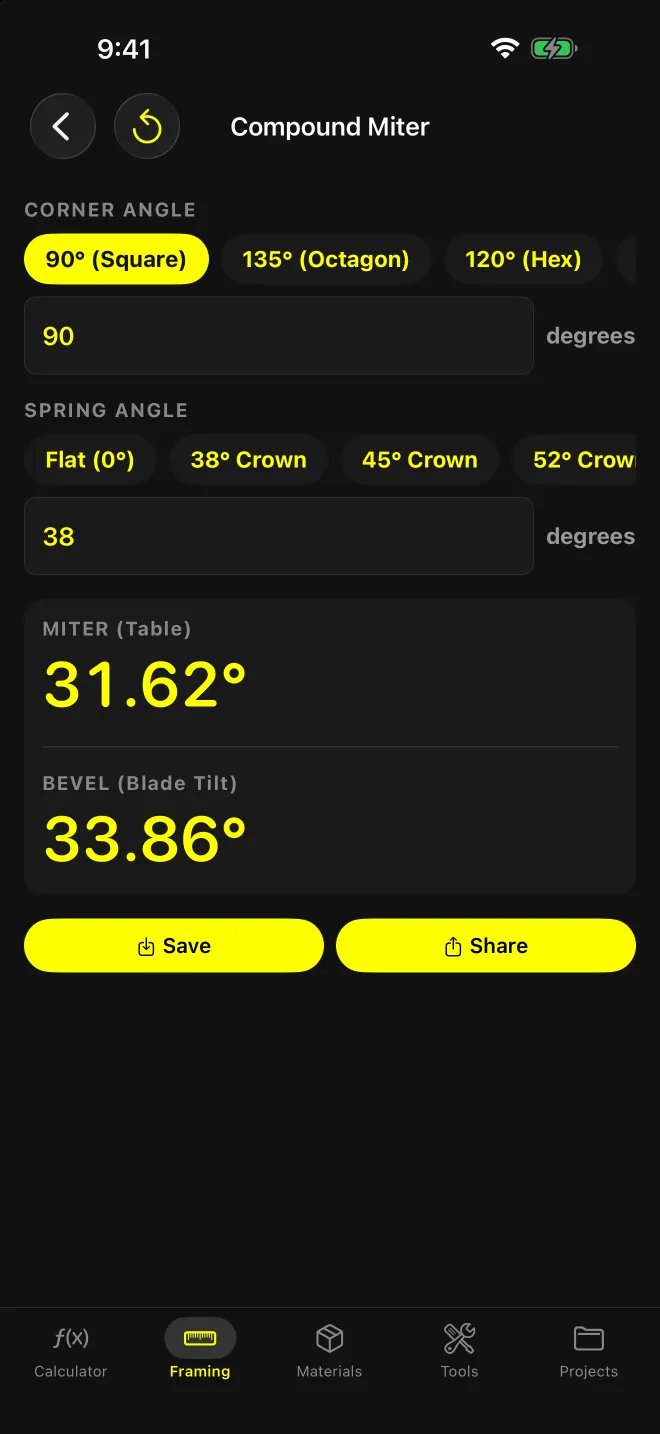
What does this screen solve?
Crown at a corner that isn’t 90°, or any crown cut lying flat on a compound miter saw. The saw needs two numbers, table and blade tilt, and neither is the corner angle. This screen takes any corner and any spring angle.
It also handles flat trim (baseboard, casing) at odd corners, where there’s no bevel at all.
What goes in?
CORNER ANGLE. Presets: 90° (Square), 135° (Octagon), 120° (Hex), 45°, or Custom to type any value in degrees.
SPRING ANGLE. Presets: Flat (0°), 38° Crown, 45° Crown, 52° Crown, or Custom. The app treats spring angle as the angle the molding sits from the wall. 0° is flat trim.
Results update as you tap or type.
What comes out?
Two numbers, large, to two decimals:
- MITER (Table)
- BEVEL (Blade Tilt)
Both are measured from a square cut (0° miter, 0° bevel), which is how saw scales read. Long-press either one to copy it. Save to a project and Share as text sit underneath.
The formulas, straight from the app:
- Flat trim: miter = 90° − C/2, bevel = 0°
- Crown: miter = atan( sin S ÷ tan(C/2) ), bevel = asin( cos S × cos(C/2) )
C is the corner angle, S the spring angle.
Worked example: 90° corner, 38° crown
C/2 = 45°, and tan 45° = 1.
- Miter: sin 38° = 0.6157, and atan(0.6157 ÷ 1) = 31.62°
- Bevel: cos 38° × cos 45° = 0.7880 × 0.7071 = 0.5572, and asin(0.5572) = 33.86°
Those match published charts for 52/38 crown at a square corner, one of two chart values the app’s formulas are checked against. (The other: 45/45 crown at 90° gives 35.26° miter, 30.00° bevel.) For 52/38 crown, use the 38° preset.
Swap to the 135° (Octagon) preset with the same crown and you get 14.31° miter and 17.55° bevel. Flat trim at 135° is a plain 22.5° miter.
Why measure the corner?
Drywall corners are rarely 90°. With 38° crown, a 92° corner moves the settings to 30.73° miter and 33.19° bevel: about 0.9° and 0.7° off the square-corner numbers. An 88° corner goes the other way, to 32.52° and 34.53°.
Read the actual corner with an angle finder and enter the full angle under Custom. The app does the halving.
What are the limits?
- Flat on the table only. Both numbers assume the crown lies flat on the saw table for a compound cut. If you cut crown nested upside down against the fence, that’s a plain miter with no bevel, and this screen doesn’t calculate it.
- No inside/outside or left/right instructions. The output is two angles from square. Which way to swing the table and which side of the blade the keeper sits on is on you.
- Spring angle must be under 90°. Corner angle must be between 0° and 360°.
- Saw limits aren’t checked. If your saw’s bevel scale stops short of the number, the app won’t tell you.
For polygons (a 6- or 8-sided bay, a post wrap), Polygon (Pro) gives the miter per joint from the number of sides.