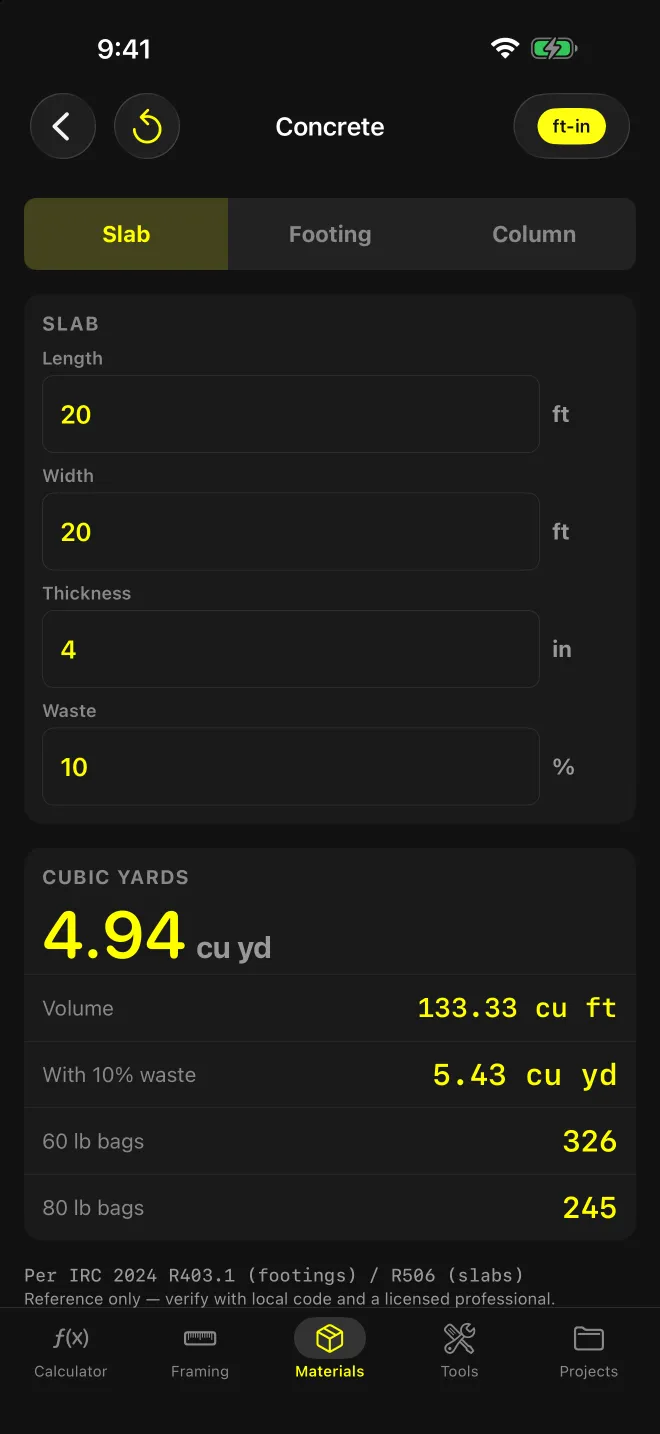
What does the Concrete screen answer?
Two questions before a pour: how many yards to call in, or how many bags to haul. Pick Slab, Footing or Column, enter the dimensions, and cubic yards comes up first, because that’s the unit ready-mix is ordered in.
Bag counts sit underneath for the small pours: a pad, a few piers, a post footing.
What goes in?
Slab
Length (ft), width (ft), thickness (in).
Footing
Length (ft), width (in), depth (in). Continuous footing, cross-section in inches.
Column
Diameter (in), height (ft). Round columns and piers.
Waste
A percent field shared by all three modes. Defaults to 10%.
What comes out?
- Cubic yards: the headline, net of waste, two decimals.
- Volume: cubic feet, net.
- With 10% waste: cubic yards including the waste allowance.
- 60 lb bags and 80 lb bags: rounded up, based on volume with waste.
The formula for the active mode prints under the results. For a slab: cu ft = L × W × (thickness ÷ 12), cu yd = cu ft ÷ 27. Share sends the results as text.
Worked example: 20′ × 20′ slab at 4″
- Volume: 20 × 20 × (4 ÷ 12) = 133.33 cu ft
- Cubic yards: 133.33 ÷ 27 = 4.94 cu yd
- With 10% waste: 133.33 × 1.10 = 146.67 cu ft = 5.43 cu yd
- 60 lb bags: 146.67 ÷ 0.45 = 325.9, rounded up to 326
- 80 lb bags: 146.67 ÷ 0.60 = 244.4, rounded up to 245
245 bags is a truck pour, not a mixer pour. Order off the 5.43.
What does the screen assume?
Bag yields are fixed. 0.45 cu ft per 60 lb bag, 0.60 cu ft per 80 lb bag, the manufacturer’s published values. If your bag lists a different yield, the count will be off by the ratio.
Waste applies to the bags and the “with waste” row only. The headline cubic yards is net. Sub-grade variation, over-excavation and spillage all add volume, and the app says so on screen. Set the waste field to match your site.
Ready-mix has minimum-load charges. The disclaimer tells you to confirm before ordering, and it’s right. The app doesn’t know your supplier’s minimum.
One shape per calculation. A slab with thickened edges is two runs: the slab, then the edge as a footing. Add the yards yourself.
Round columns only. For a square pier, use Footing mode: height as length, the two sides as width and depth. A 12″ × 12″ pier 4′ tall is 4 × 1 × 1 = 4 cu ft.
Does it check footing size against code?
No. The screen shows IRC 2024 R403.1 (footings) / R506 (slabs) as its reference, with the standard note to verify with local code and a licensed professional. It computes volume from whatever width and depth you enter (sizing those is covered in the footing sizing guide).
For gravel base under the slab or shapes these three modes don’t cover, Area, Volume, Weight & Cost handles boxes, cylinders and cones, and converts yards of gravel to tons (the tonnage screen is Pro).